AI-translated from the Chinese original View original
When I first built my Ceph cluster, I planned to write about the experience. I later decided to give it a longer period of stability testing in a home environment before looking back. The cluster has now run for roughly seven years, with disks and nodes gradually replaced along the way.
This article shares my Homelab storage choices and my experience of Ceph’s performance, stability, and maintenance. The failures and performance impressions come from my own use, as a reference for readers with similar requirements.
Choosing a Storage Approach
A NAS provides file services over a network, with many possible storage implementations underneath. Commercial appliances can use conventional RAID or offer mixed-capacity schemes. A self-built NAS might use Linux software RAID, ZFS, or Unraid. Ceph can underpin file services too, although it is itself a distributed storage system.
My earlier storage setup
Before Ceph, I used a hardware RAID card with a JBOD enclosure in 2015. Three issues became apparent over time.
Wasted space with mixed-capacity disks. Arrays were organized around smaller members, leaving extra capacity on newer, larger disks underused.
Slow rebuilds. Replacing a failed disk meant a lengthy rebuild that also affected everyday reads and writes.
Multiple-disk failure risk during rebuilding. While the degraded array rebuilt, another failure could exceed its redundancy and cause data loss.
Comparing Common Storage Options
Common home-storage choices occupy different product and technology layers.
-
RAID organizes disks through a hardware controller or operating system and commonly underpins NAS storage.
-
Synology integrates storage management, file sharing, and applications in a NAS appliance. SHR-2 pools are the comparison point here.
-
ZFS combines a filesystem with volume management and is a common foundation for a self-built NAS.
-
Unraid is an operating system for self-built storage, managing a main array and separate pools.
-
Ceph provides distributed block, file, and object storage interfaces.
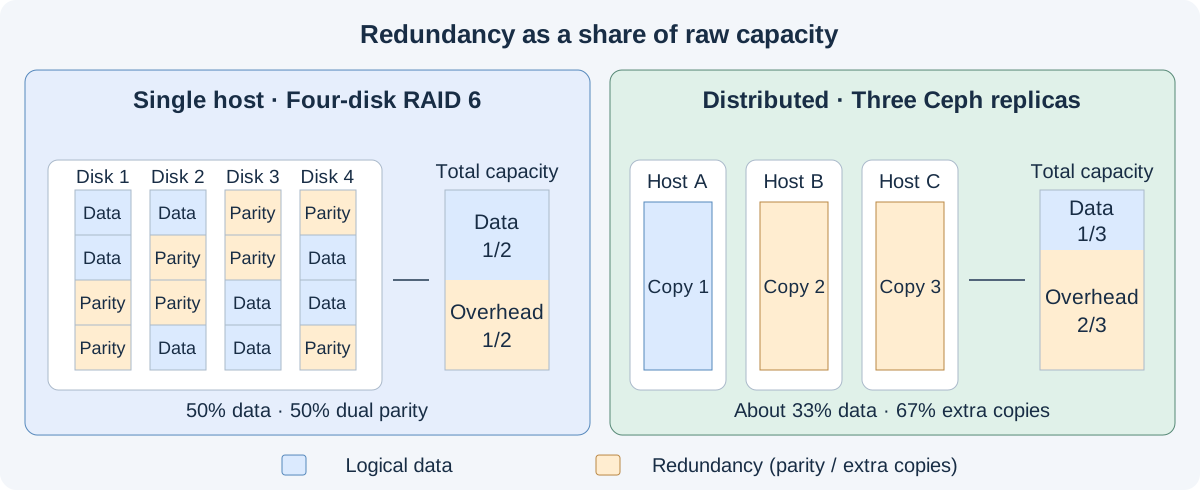
The capacity bars show aggregate proportions, with metadata and recovery reserves excluded. They do not represent physical partitions. Different replica colors distinguish capacity overhead, with no primary/secondary relationship implied.
Single-disk redundancy leaves no redundancy after one disk fails. Another failure during rebuilding can then cause data loss. For home storage that runs for years while disks age, that is a significant reliability concern. I therefore use configurations able to preserve data through at least two disk failures as the baseline.
The configurations are RAID 6, Synology SHR-2, ZFS RAIDZ2, Unraid dual parity, and Ceph with three replicas.
| Aspect | RAID | Synology | ZFS | Unraid | Ceph |
|---|---|---|---|---|---|
Deployment |
Single host |
Single host |
Single host |
Single host |
Distributed |
Configuration |
RAID 6 |
SHR-2 |
RAIDZ2 |
Dual parity |
Three replicas across hosts |
Principle |
Striping and dual parity |
Combined capacity partitions and dual-disk redundancy |
Copy-on-write and dual parity |
Independent data disks and two parity disks |
Distributed object replicas |
Block storage |
△ |
✓ |
✓ |
△ |
✓ |
Object storage |
△ |
△ |
△ |
△ |
✓ |
Mixed capacities |
△ |
✓ |
△ |
✓ |
✓ |
Expansion |
△ |
△ |
△ |
✓ |
✓ |
Two-disk failures |
✓ |
✓ |
✓ |
✓ |
✓ |
Failure domain |
△ |
△ |
△ |
△ |
✓ |
Node maintenance |
✗ |
✗ |
✗ |
✗ |
✓ |
Scale across hosts |
✗ |
✗ |
✗ |
✗ |
✓ |
Hardware replacement |
△ |
△ |
✓ |
✓ |
✓ |
Recovery |
Array rebuild |
Array rebuild |
Resilver |
Reconstruct from remaining disks and parity |
Recover from other replicas |
Rebuild load |
Array members |
Affected pool members |
Affected vdev |
Remaining array members and parity disks |
Affected OSDs, nodes, and network |
Maintenance scope |
Host, controller, disks |
NAS host and pool |
Host, pool, vdevs |
Host, array, parity disks |
Nodes, network, cluster services |
Capacity overhead |
Equivalent to two member disks |
Dual-disk redundancy, with capacity-combination constraints |
Equivalent to two disks per vdev |
Two parity disks |
Configurable |
✓ Supported, △ conditional or requires additional design, ✗ absent from the deployment itself.
Three healthy replicas retain data after two data disks fail, but continued I/O also depends on the minimum replica count and MON quorum. With
min_size=2, a PG with only one surviving replica stops I/O. See the pool documentation.Capacity overhead depends on redundancy policy. Node count does not determine replica count. Three nodes can use two replicas, whose extra copy consumes 1/2 of raw capacity, but that configuration lacks two-disk fault tolerance. Three replicas spend 2/3 on extra copies. Erasure coding can reduce that overhead. Metadata and recovery reserves further reduce usable capacity.
For ordinary home storage such as photos, media, file sharing, and backups, a single-host system is usually sufficient. It costs less in hardware, power, and maintenance and is simpler to manage than a multi-node cluster.
Why I Chose Ceph
Ceph is an open-source distributed storage project originating in Sage Weil’s research. Inktank later commercialized it, and Red Hat acquired Inktank in 2014. In 2022, Red Hat’s Ceph team moved to IBM. Development continues through the community and multiple vendors.
Its foundation is RADOS distributed object storage. Objects map through placement groups (PGs) and CRUSH rules to OSDs, the storage processes managing disks, with replicas retained according to policy. RBD, CephFS, and RGW expose block, file, and object interfaces. The architecture documentation explains the layers. The diagram uses three replicas across hosts.
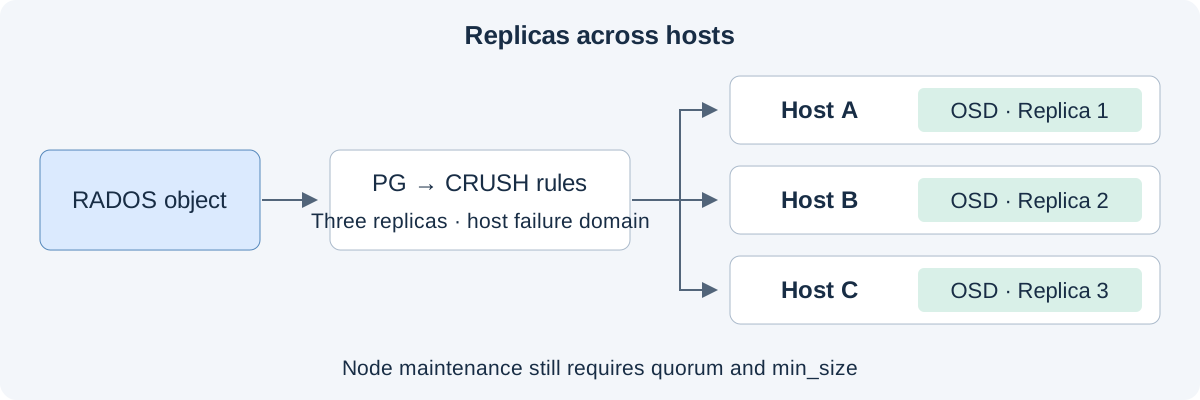
My choice came down to several requirements.
-
Mixed capacities and natural replacement cycles. Mixed-capacity support is essential. Disks should be replaced individually as they age, with old and new capacities continuing to work together through weighted placement.
-
Hardware renewal with limited migration. Disk and node replacements can proceed gradually, with the cluster recovering and rebalancing affected data. This minimizes movement and avoids migrating the entire dataset to another storage system just to replace hardware.
-
Availability and capacity trade-offs. Critical services need access during single-node maintenance. I accept capacity overhead and maintenance costs, using different redundancy levels for different data classes.
The redundancy overhead is acceptable to me. My household dataset is manageable, HDD storage remains relatively inexpensive, and even in 2026 I still have a stock of enterprise disks formerly used for Chia farming.
I also evaluated GlusterFS early on. Its distributed-filesystem focus seemed best suited to primarily file-oriented use. My Homelab needed VM block storage, file sharing, and object storage together, which led me to Ceph.
Performance in Practice
I initially tried two ways to accelerate HDDs with NVMe, using bcache at the block layer and placing BlueStore metadata on a fast device. Each offered benefits and introduced different failure dependencies.
Experiment with bcache
bcache sits beneath the block device used by an OSD, using NVMe as a cache for HDD capacity.
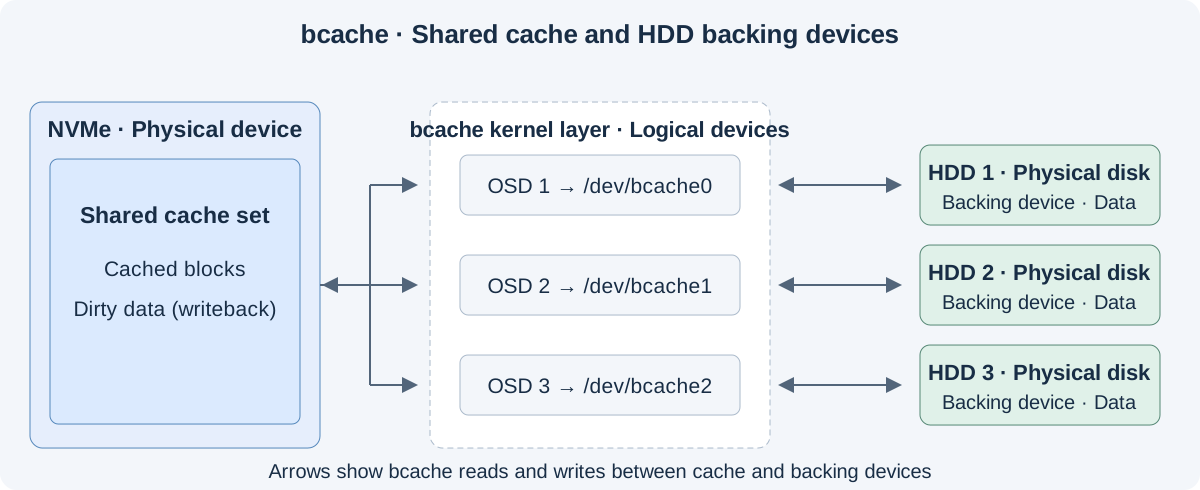
Cache hits read from NVMe. Misses read from HDD and populate the cache according to policy. Writeback first writes to NVMe and later destages to HDD. Writethrough waits for the HDD write.
The benefit depends on access patterns and hit rate. My NAS contains many infrequently accessed files. Reading cold data for the first time still requires the HDD, limiting the improvement for that workload.
In actual use, I encountered potential stability issues and also had to consider cache-device failure. In writeback mode, NVMe may hold data awaiting destaging, making it a critical part of the storage path. Sharing one cache device across several backing disks can affect multiple devices at once and complicate diagnosis and recovery.
Experiment with BlueStore Metadata Acceleration
Another approach keeps data on HDD while placing BlueStore’s block.db on NVMe. block.db holds RocksDB metadata, and block.wal holds the write-ahead log. With a separate DB device, WAL normally uses that device too. See the BlueStore configuration reference.
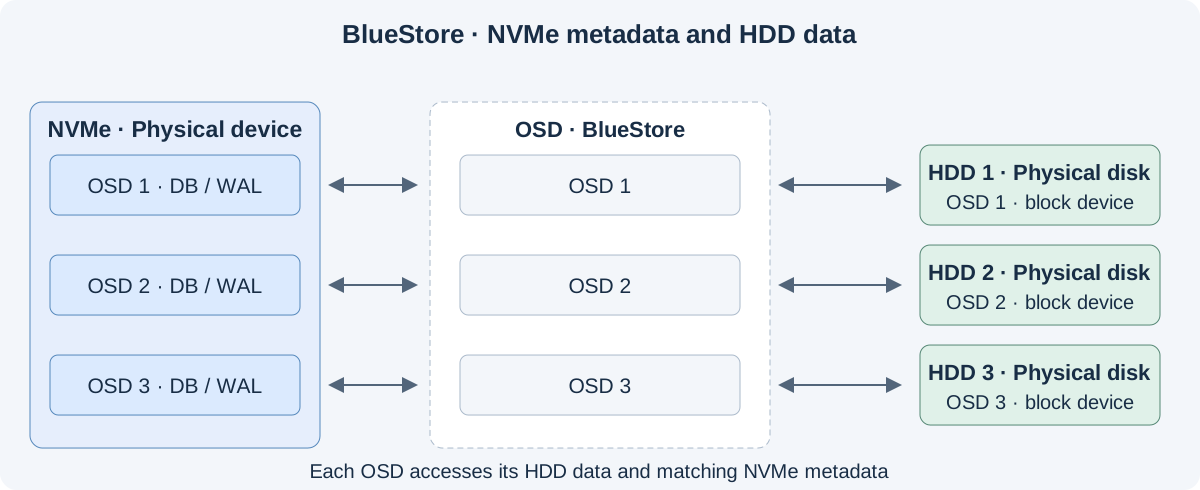
A single NVMe can contain separate DB/WAL areas for several HDD OSDs. Each OSD coordinates access, using metadata to locate HDD data blocks and managing data persistence alongside metadata and log updates. Metadata already cached in memory needs no NVMe read.
The earlier FileStore backend depended on a local filesystem such as XFS and an additional journal. BlueStore manages block devices directly, reducing intermediate filesystem overhead and supporting checksums, compression, and metadata placement on faster devices. See the storage backend documentation.
Moving metadata provides no file-content cache. Cold reads still incur HDD seek and media latency.
The largest risk is losing data on associated OSDs when a shared NVMe fails.
Loss of dirty cache data or BlueStore DB/WAL can make an OSD’s data unrecoverable even with an intact HDD. One NVMe serving multiple OSDs concentrates the impact. Recovery depends on complete copies elsewhere in the cluster.
Both approaches increased stability concerns and maintenance complexity in my environment, with limited improvements for cold reads. I eventually moved away from them. My experience informed that personal choice without establishing a universal defect in either design.
The Final Choice of Separate Pools by Medium
I separated HDDs and NVMe into independent pools, using device classes and CRUSH rules to control placement. Workloads needing higher IOPS, throughput, and lower latency use NVMe directly. Capacity-oriented workloads use HDDs, with placement and migration arranged at the application side.
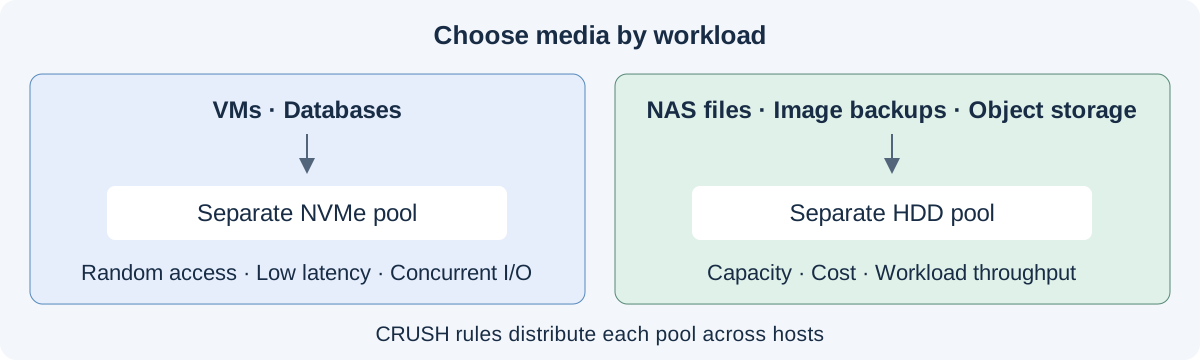
My storage network runs at 10GbE. Tests and long-term use show that the HDD pool meets my needs for NAS files, VM image backups, and capacity-oriented object storage. Small files, random access, concurrency, and recovery load still affect the experience, so these results do not imply that every workload saturates 10GbE.
Here is an early CephFS file read/write test.
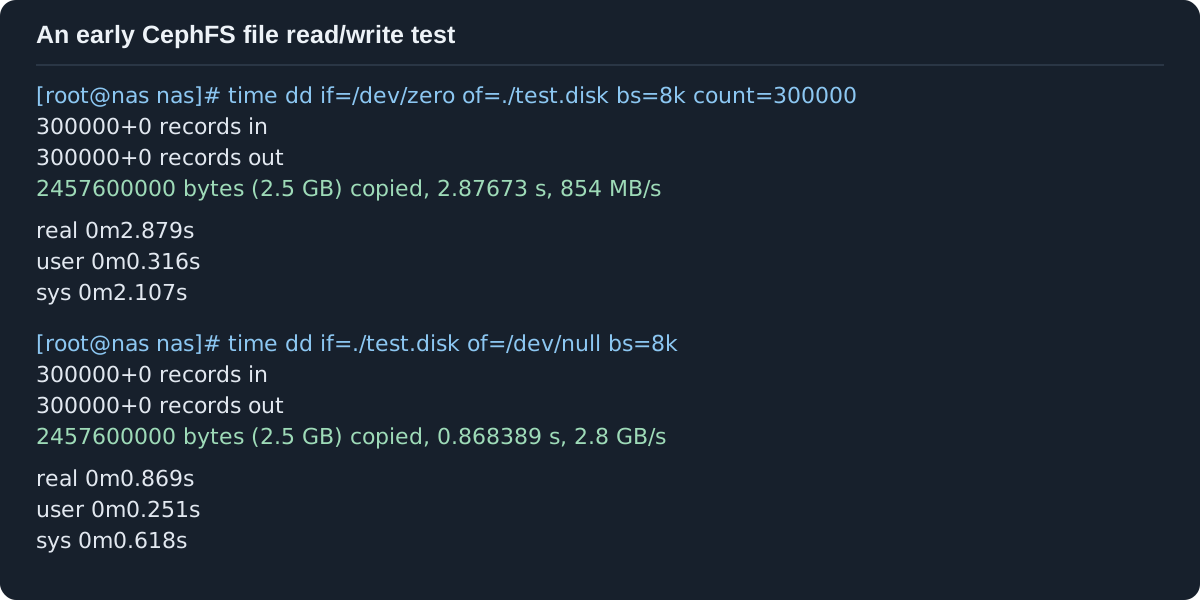
The test ran in a CephFS mount with a roughly 2.46 GB file. It reported 854 MB/s for writing and 2.8 GB/s for reading. Cache effects are included, so those values cannot be equated with sustained HDD persistence or network throughput. Together with everyday use, the result supports the suitability of file access performance for my NAS needs.
In mid-2025, before the subsequent broad rise in SSD prices, I replaced a node with an all-flash U.2 NVMe configuration, continuing the move toward flash storage.
Planning a gradual move to 25GbE
I chose a 25GbE SFP28 NIC during that replacement. SFP28 and SFP+ share a compatible physical form factor. A 25G NIC supporting 10G operation can connect to an existing SFP+ 10G switch, allowing upgrades in stages. See NVIDIA’s connector definitions.My DAC cables are rated for 25G and currently run at 10G with the existing switch. The NIC and cables can be reused when the switch is upgraded. NIC speed support and switch compatibility with the chosen DAC still need checking. The performance experience described here is based on the 10G network.
Stability in Practice
For seven years, the cluster has served everyday storage through disk and node replacements, hardware failures, and several whole-rack power losses. I have experienced no loss of already-written data. The following observations come from that period of operation.
Power Stability
I initially debated adding a UPS, mainly because I worried about data loss after sudden power cuts. A UPS also brings trade-offs.
-
Lithium battery safety. Thermal runaway can cause fires, with risk depending on chemistry, battery management, and product design.
-
Lead-acid weight. Weight affects handling and installation.
-
Long-term capacity loss. Both types age, reducing backup runtime and requiring checks and eventual replacement.
Eaton’s UPS battery documentation discusses differences in safety and lifetime.
My tests produced no data loss. Over the years, the rack lost power roughly three or four times, again with no loss of already-written data. Those experiences made me comfortable with power-loss recovery in my own setup.
My requirement is that writes still incomplete at the instant of power loss may fail, while data confirmed as durable should remain. VM and database behavior still depends on transaction commits, synchronization, and devices honoring flush requests.
The tests and incidents cover a limited set of failures. Ceph replication works alongside device power-loss protection, correct persistence semantics, UPS protection, and independent backups. Replicas in the same rack also share the rack’s power-failure exposure.
Common Failures
-
HBA failures. I used second-hand server parts. Home cooling was also limited by noise considerations, which may have contributed. Server components' expected airflow needs attention in a home chassis.
-
Disk-backplane failures. A chassis bought from a small manufacturer developed a front drive-cage backplane fault. Offline-disk diagnosis needs to include backplanes, cables, controllers, and power.
-
Aging HDD replacement. I replaced disks as reallocated sectors reached warning levels, as part of planned maintenance before complete failure.

osd.8 on pve-03 shown as out/down and the other listed OSDs in/upCross-node replication keeps data available on other nodes through such local failures. An HBA or backplane can affect several disks simultaneously, so failure-domain planning needs to consider more than individual disks. Maintenance also requires checking the health of other nodes to avoid overlapping failures.
Ceph Best Practices for a Homelab
A Dedicated Storage Network
I separate the PVE and Ceph networks. PVE carries compute-side management and workload traffic. Ceph carries storage access, OSD replication, heartbeats, and recovery.
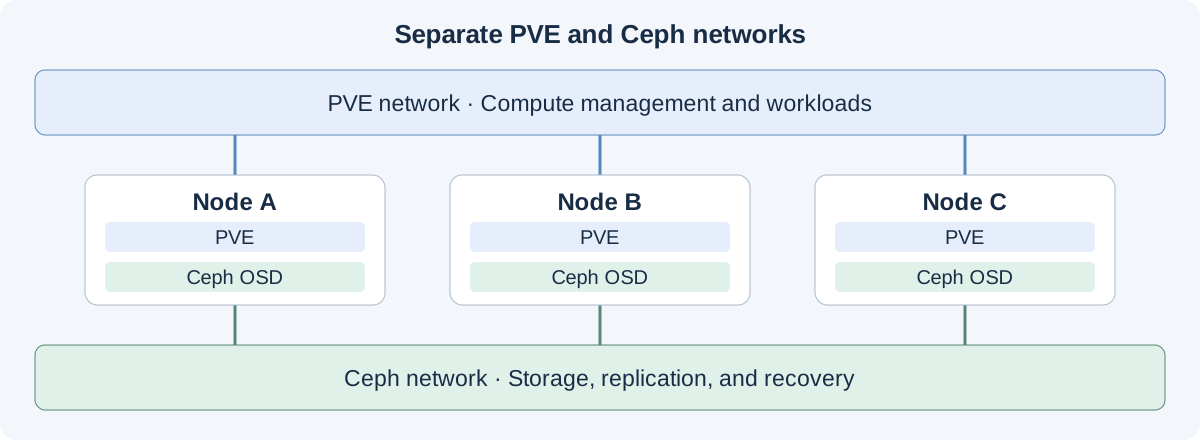
The separation is especially useful during recovery. Failed disks, returning nodes, and rebalancing generate extra transfers. Keeping that traffic apart reduces bandwidth contention and makes the storage and compute networks easier to observe individually.
My design has only those two networks. Client access and OSD-to-OSD traffic share the Ceph network, with no further split between public_network and cluster_network. I chose to keep home-network complexity manageable. See the network configuration documentation.
Actual isolation also depends on physical links. VLANs separate logical networks but still share bandwidth on a common uplink. Capacity planning needs to cover both routine access and recovery.
Pool and Replica Policies
I divide pools by medium and data class and choose redundancy separately. Three considerations guide that arrangement.
-
Medium and workload. Low-latency, higher-I/O workloads use NVMe. Capacity-oriented workloads use HDDs. CRUSH rules constrain placement to the appropriate media.
-
Data importance and capacity cost. Replica count is per pool. Three replicas retain more redundancy headroom. Two improve capacity efficiency but leave less headroom after a failure. The decision depends on importance, recovery cost, and independent backups.
-
Replicas and failure domains. Tolerating a whole node offline requires replicas across hosts. Multiple copies on one host share its failure exposure. Separate pool names alone provide no physical-device isolation.
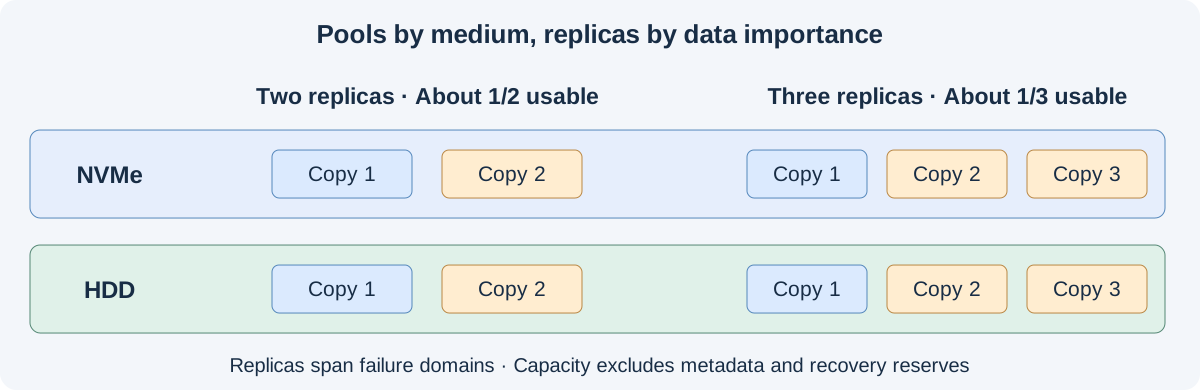
Devices need free space for recovery and rebalancing. Dividing raw capacity by replica count alone overestimates usable space. Pools sharing OSDs also share disk capacity and I/O resources.
Consider
sizeandmin_sizetogether. Three replicas withmin_size=2can continue I/O after one copy is lost, assuming quorum and other requirements remain satisfied. With two replicas and the same minimum, losing one stops affected I/O. Reducing replicas changes maintenance availability as well as capacity overhead. See the pool documentation.
Using OSD noout
For a home cluster whose alerts can be monitored and acted on promptly, I favor noout. Temporary network problems, reboots, or connection issues can otherwise cause a recoverable OSD to be automatically marked out, trigger data migration, and require another rebalance when it returns.
noout prevents down OSDs from being automatically marked out after the timeout. It neither keeps them online nor blocks all recovery and movement. The OSD troubleshooting documentation covers setting and clearing it during maintenance.
# Cluster-wide noout affects automatic out behavior across the cluster
ceph osd set noout

# Clear after temporary maintenance and state verification
ceph osd unset noout
For planned work, version support may allow narrowing the scope to affected OSDs or hosts. Retaining cluster-wide noout means actively taking responsibility for failures.
Pay particular attention to OSD down, degraded or undersized PGs, disk health, and capacity alerts. A short outage may justify waiting for a device to return. Permanent failures need replacement or removal so the cluster can restore copies. Continued application access provides no reason to leave the cluster degraded indefinitely.
If the first failed disk remains unattended and further replica-bearing devices fail, redundancy can gradually disappear, making data unavailable or lost. If prompt alert response is impractical, I advise keeping automatic recovery enabled, with sufficient reserve capacity, instead of retaining global noout long-term.
Independent Backups for Important Data
Replicas address device and node failures. Recovering accidental deletion, erroneous overwrites, or malicious deletion requires a separate backup strategy. I retain static backups of cold data and back up selected critical data to cloud object storage.
Independent cold-data copies allow recovery without depending entirely on the original Ceph cluster. Cloud object storage adds a separate location so a rack-level incident cannot affect every copy.
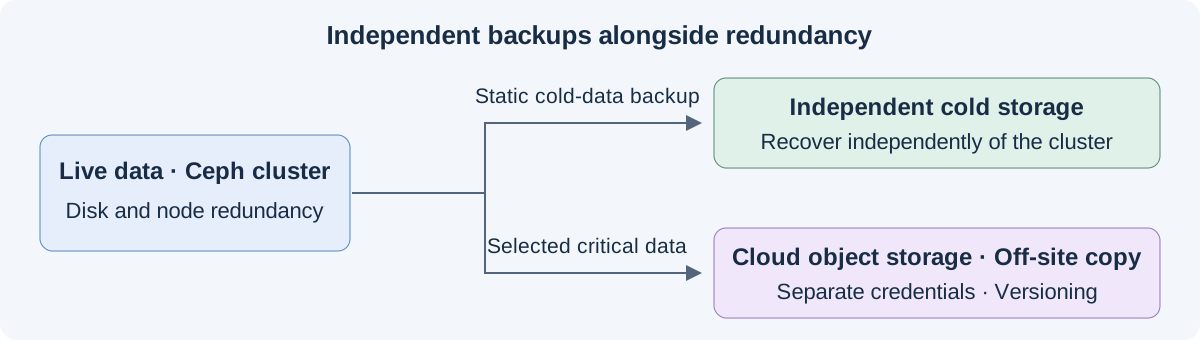
The 3-2-1 backup principle
Retain at least three copies of important data, across at least two types of storage media, with one copy off-site. The three include the original and two backups. Copies inside one Ceph cluster cannot substitute for independent backups. See CISA’s backup guidance.
Cloud backups store selected important data in object storage. I separate routine backup credentials from administrative credentials and limit access to required buckets and prefixes. Daily writers should especially lack permission to delete historical versions or change versioning settings. Versioning retains earlier copies after accidental overwrites or deletions.
Versioning also needs permissions and retention policies. Backup completion, availability of historical versions, and actual file recovery all need periodic checks.
An off-site cluster is another possibility
Ceph supports cross-cluster synchronization through RBD mirroring, CephFS snapshot mirroring, and RGW multisite. With another cluster elsewhere and enough inter-site bandwidth, a home setup could even start entertaining multi-data-center ambitions 😝Snapshots or retained historical versions are still needed alongside synchronization to recover from accidental deletion and overwriting.
Looking Ahead
After seven years of continuous 24×7 use, hardware failures, aging-disk replacements, and node retirements, Ceph has demonstrated its long-term design reliability in my own application. I have yet to find a better alternative that fits my needs and intend to keep using it for the long term.
Last modified on 2026-07-26