AI-translated from the Chinese original View original
As AI-generated code became more common in my work, the amount of code needing review grew too. Code review took increasing time and effort. Each review still required understanding the background, tracing the affected modules, and deciding whether the implementation made sense.
To reduce that burden, I tried building a desktop tool with Claude and named it Code Meeseeks. Based on the open-source PR-Agent, it brings pending PRs, code reading, AI analysis, follow-up questions, and comment drafts into one client. The project is open source and has had a small trial within my team.
The name comes from Mr. Meeseeks in Rick and Morty, summoned to help complete a specific task. That seemed fitting for a review assistant.
Source code is on GitHub, with installation and usage information on the project website.
Breaking Down the Requirements
Internal teams, open-source communities, and commercial vendors already offer many team-oriented review tools. I also wanted a tool for the individual reviewer, helping me understand and verify each change. Several needs shaped it.
🔍 Build context for the reviewer
A substantial part of manual review happens before judging an issue. A complex PR in a complex project requires understanding the author’s goal, relationships between changes, and effects on existing behavior. Larger changes increase that reading and verification work.
Reviewers have different familiarity with projects and modules. Familiar code can draw on memory. Unfamiliar modules require following implementations and call relationships. Team-level tools struggle to explain each change at the level each reviewer needs. I wanted explanations that could follow my own progress and build context gradually.
🎯 Retain personal review priorities
Reviewers focus on different concerns, including business correctness, edge cases, error handling, performance, and compatibility. I wanted to state my priorities and direct analysis toward them.
Rule preferences also need adjustment, including code quality, module responsibilities, design style, and project conventions. I wanted to maintain those requirements and match them by repository, combining project standards with my own focus.
💳 Reuse AI subscription allowances
I wanted to use existing AI subscriptions, for example by running reviews through an installed, authenticated Codex CLI or Claude Code. Reusing those accounts and allowances could reduce the additional cost of model APIs.
Model integration therefore needed local CLI support alongside common model APIs and compatible endpoints, leaving a choice based on available tools and accounts.
💬 Keep interacting during review
While reading an explanation, I wanted to ask follow-up questions using actual code and existing analysis, deepening my understanding of a module, call relationship, or specific risk. Later analysis should carry the earlier discussion and code references.
I also wanted to retain decision-making over published feedback. AI produces candidate findings, which I verify, edit, and select before posting to the original platform. Local repository copies, analysis history, and drafts make it easier to return after switching tasks.
For the review itself, I wanted an editor experience close to VS Code, with smooth Diff reading, file navigation, code positioning, and local search for related implementations.
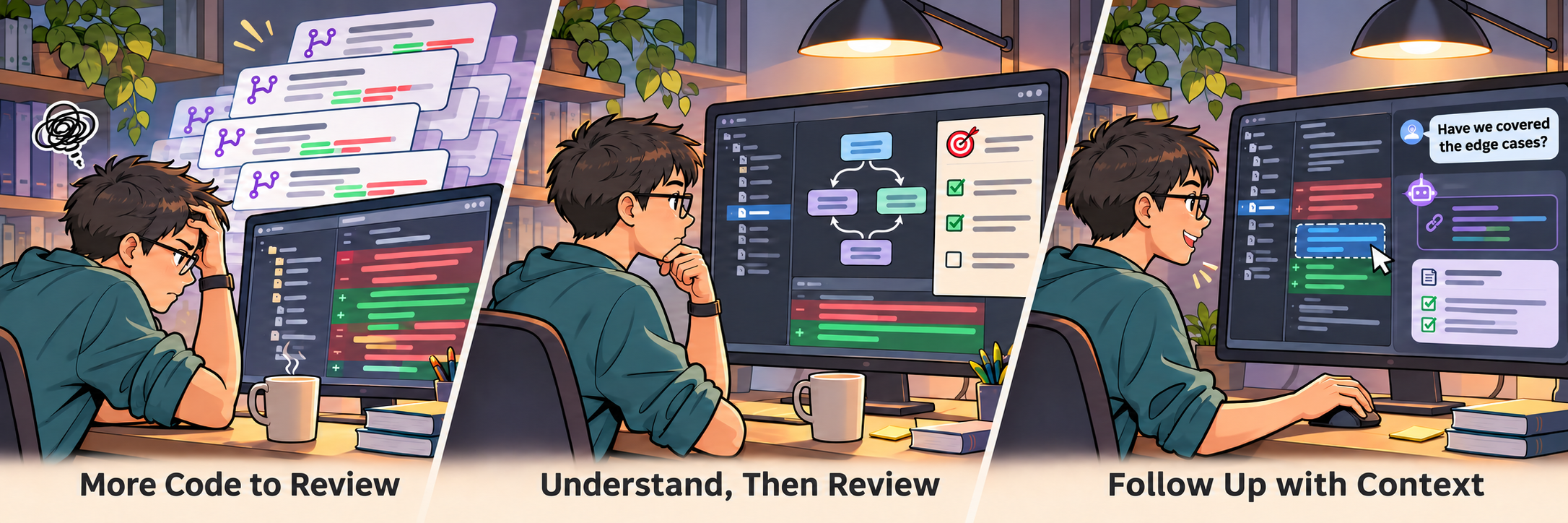
Those requirements led me to a desktop client that places Diffs, findings, and conversation together, allowing an individual to read, analyze, and prepare feedback on existing PRs.
Local storage and model access are configured separately.
Repository copies and drafts stay on the computer. Review context is sent to the model service chosen by the user. The model and deployment arrangement need to fit the code’s permitted use.
A desktop client also means maintaining installers, a local runtime, and cross-platform behavior. Personal settings live on different computers, while shared rules need an agreed update and distribution process. During early validation, I accepted those costs to establish the individual review workflow.
Design Decisions
Building on Mature Review Capabilities
Reusing existing review capabilities was the project’s central design choice. PR-Agent, contributed to the community by Qodo, already supports change descriptions, issue analysis, and PR questions. Code Meeseeks uses it directly as the review engine.
My experience with Qodo
I had tried Qodo reviews on GitHub and liked its change overviews, file-change grouping, and code suggestions. Establishing the structure of a change before reading the important code reduced the effort of building context and strongly influenced my decision to reuse PR-Agent.
An existing review engine lets me focus design and implementation effort on how the reviewer reads results, investigates issues, and confirms and publishes feedback.
The engine runs through an embedded Python runtime. Installers include the required environment to reduce dependency setup for users.
The workflow also follows Qodo’s approach to reading changes, generating findings, asking follow-up questions, and confirming feedback. A typical session proceeds as follows.
-
Fetch pending PRs and organize them by repository.
-
Open a PR, read the Diff, and use
/describefor an overview and file-change explanations. -
Run
/reviewto inspect potential issues and their code locations. -
Select code or quote a suggestion and continue with
/ask. -
Turn useful findings into drafts, edit them, and publish to the code platform.
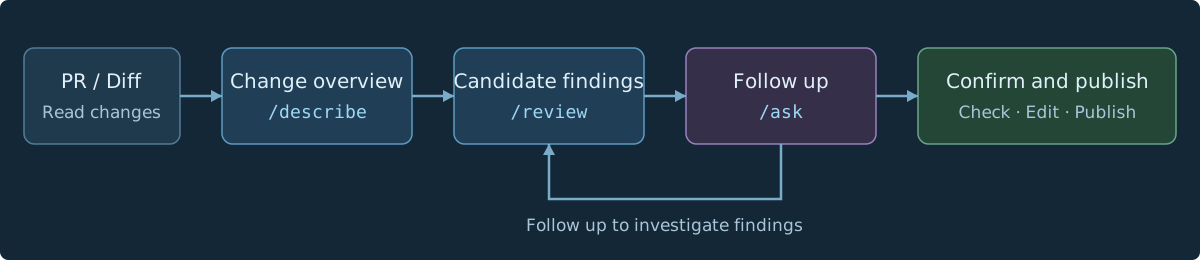
Generated findings first enter a candidate list and can be edited, discarded, or turned into comment drafts. The reviewer confirms published content. With automatic pre-review enabled, pending PRs can be analyzed in advance so results are ready when the client opens.
Local Repository Caching
Online repository APIs commonly provide PR Diffs as the immediate review context. Understanding unchanged code, cross-file calls, or history requires further searches and reads, limiting what a single request can supply.
The client therefore caches repository mirrors locally and prepares worktrees for the versions involved in a PR. After the first fetch, incremental synchronization keeps them current. Reading and analysis reuse those repositories. File contents are read at the relevant commits and Diffs calculated locally, also supporting fast searches, historical comparisons, and blame analysis.
Local repositories support further context interaction too. A reviewer can explore related implementations from a changed line, and an agent running through a local CLI can inspect worktree files to investigate beyond the Diff and into historical context.
Agent Design
PR-Agent supplies the basic descriptions, reviews, and questions. I added capabilities around the experience I had with Qodo’s commercial version and the local client’s context interactions.
🧩 Architecture diagrams and design explanations
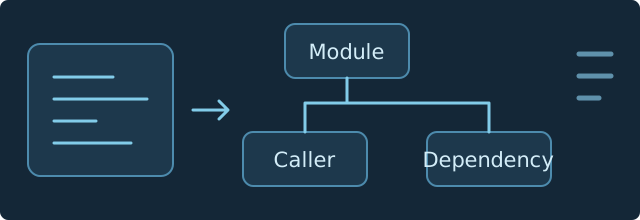
I added architecture output similar to what I had used in Qodo’s commercial product. /describe generates Mermaid diagrams rendered in the client to explain affected modules and relationships.
Alternative implementation ideas and their reasoning also help the reviewer examine design trade-offs against the code.
🔎 References and re-review
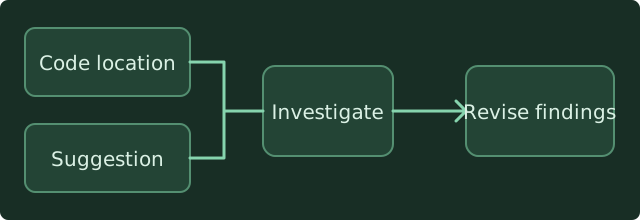
Selected code and its location can accompany a question. Existing suggestions can also provide context for another review pass.
Local CLI mode can inspect repository files to check a concern. Results can retain, replace, or close the original finding.
📚 Rule-based context
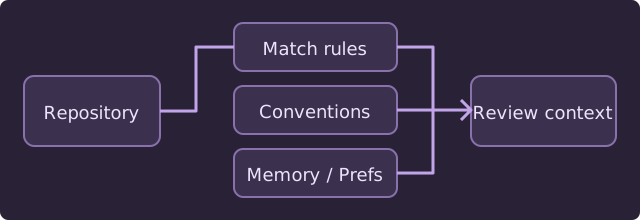
Markdown rules can be matched by repository and further scoped by project and target branch. Different repositories can use their own conventions and priorities.
The client also reads the reviewed repository’s AGENTS.md, combined with working conventions, long-term memory, and personal preferences. Shared agreements can live in Git, while personal priorities evolve with use.
⚙️ Continuous tasks and execution control
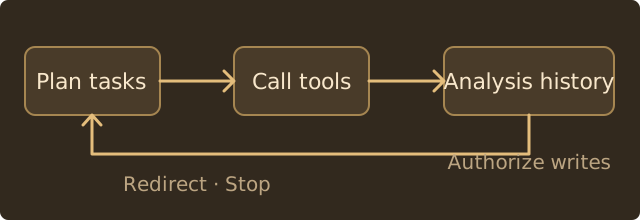
The agent organizes tool calls from natural-language requests, retains task progress and analysis history, and allows changes of direction or cancellation.
New PR commits flag a code-version change, and later conversation can recognize that earlier analysis may be stale. AutoPilot can prepare reviews in advance. Runtime authorization checks control write operations.
Multiple analysis rounds increase model use and waiting time. The client records usage and offers policies such as follow-up limits so the depth can be adjusted to the task.
Visual Design and Interaction Close to VS Code
I used VS Code’s visual style and interaction conventions to make the client familiar to developers. The stack is Electron, React, and TypeScript, with Monaco for code reading, a file tree, side-by-side and unified Diffs, syntax highlighting, and inline comments.
PRs and files occupy the left, code changes the center, and AI analysis and conversation the right. Findings link to locations, selected code can enter a question, and comment drafts can be edited near the relevant lines. Reading, analysis, and feedback preparation connect within the same workspace.
Themes, monospaced fonts, and type size are adjustable. A command palette and keyboard shortcuts expose common actions, following editor conventions to reduce the adjustment required when switching tools.

The screenshot shows one of the project’s own PRs, using the Chinese interface. The right side explains changes and architecture, the left provides the Diff, and inline drafts remain near their code. The ease of moving between analysis and implementation directly affects the effort of verifying findings.
Multiple Code Hosting Platforms
Internal collaboration at work often uses self-hosted Bitbucket Server. GitLab and GitHub are also common integration targets. I designed a shared adaptation layer so the same review workflow could operate across them.
In my personal experience, Bitbucket offers a relatively good review collaboration experience in enterprise settings. Its interaction and collaboration design also influenced Code Meeseeks.
The client integrates with GitHub, Bitbucket Server / Data Center, and GitLab, including applicable self-hosted instances. Platform adapters fetch PRs, retrieve changes, and handle comments and review actions. Code reading, AI analysis, and draft processing reuse the same higher-level workflow.
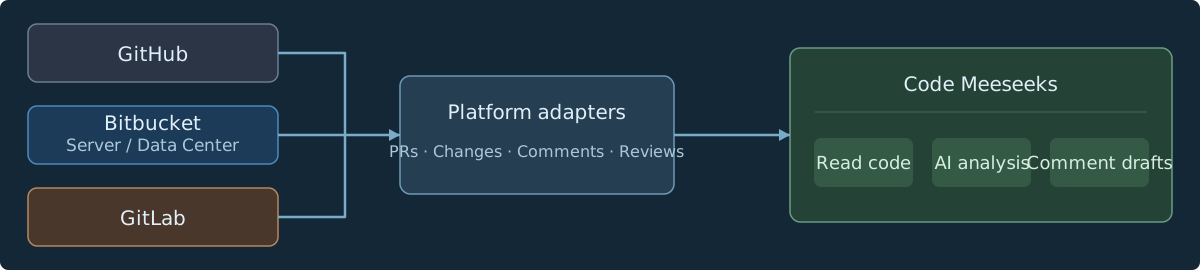
Review states, inline comments, and API capabilities differ across platforms. Available actions reflect what each platform supports. Keeping those differences in adapters also makes platform integrations and review workflows easier to maintain independently.
Tool Integration
An optional local HTTP API and companion CLI let external agents or scripts discover PRs, read changes, and invoke reviews. The desktop interface and external tools share the same local review workflow, leaving room for future integrations.
The local API listens on loopback by default and requires token authentication. Operations follow its exposed action scope. GUI, CLI, and agent interfaces share underlying service logic to reduce differences in behavior.
Early Impressions
The project has run for a month, with a small trial in the team. Feedback has been positive and has exposed practical details that needed work.
For me, the clearest benefit is understanding changes more efficiently. Reading an overview before checking key files and candidate issues is easier than constructing all the context from scratch. Some PRs that previously took thirty or forty minutes can now be reviewed in under ten.
Those timings reflect personal impressions from early use. PR size, complexity, and my familiarity vary, and I have no standardized quantitative study yet.
Useful suggestions still need checking against the code. When their assumptions are unclear, I can ask questions, add constraints, and then decide whether to use them. Editing and discarding remain part of incorporating AI output into my review habits.
Client interaction has also become an ongoing area of work. Preserving drafts across page changes, inline positioning, platform differences, and context updates after new commits all affect whether a review proceeds smoothly. Connecting a model leaves many such details to address.
Thoughts on Customized Tools
In my experience, an agent such as Codex, paired with a capable underlying model and a well-tuned harness, can already produce good code reviews. Context organization, tool use, and task execution mechanisms influence both the process and results alongside the model.
For me, Code Meeseeks adds value through further customization of interaction. Organizing pending PRs, code reading, contextual questions, and comment preparation in a familiar interface brings existing review capabilities closer to my own working habits.
Building it also changed my impression of vibe coding. Early in the year, models and agents still felt strained by somewhat complex projects. By mid-2026, in my experience, they had become more than capable of completing moderately sized projects with a meaningful degree of complexity.
Last modified on 2026-07-31