AI-translated from the Chinese original View original
Years of building and maintaining my Homelab have gradually produced infrastructure spanning local systems and cloud services, along with reasonably standardized maintenance procedures. Environment documentation, configuration management, change execution, and acceptance checks now have a documented basis.
The current approach draws on my years of experience operating SaaS systems.
Declarative configuration and GitOps manage desired state. Monitoring and alerts reveal actual behavior. SOPs record pre-change checks, execution steps, and recovery procedures. I adapted those practices to the scale and maintenance budget of my personal environment.
The diagram below summarizes the infrastructure layers and the engineering governance and observability that span them.
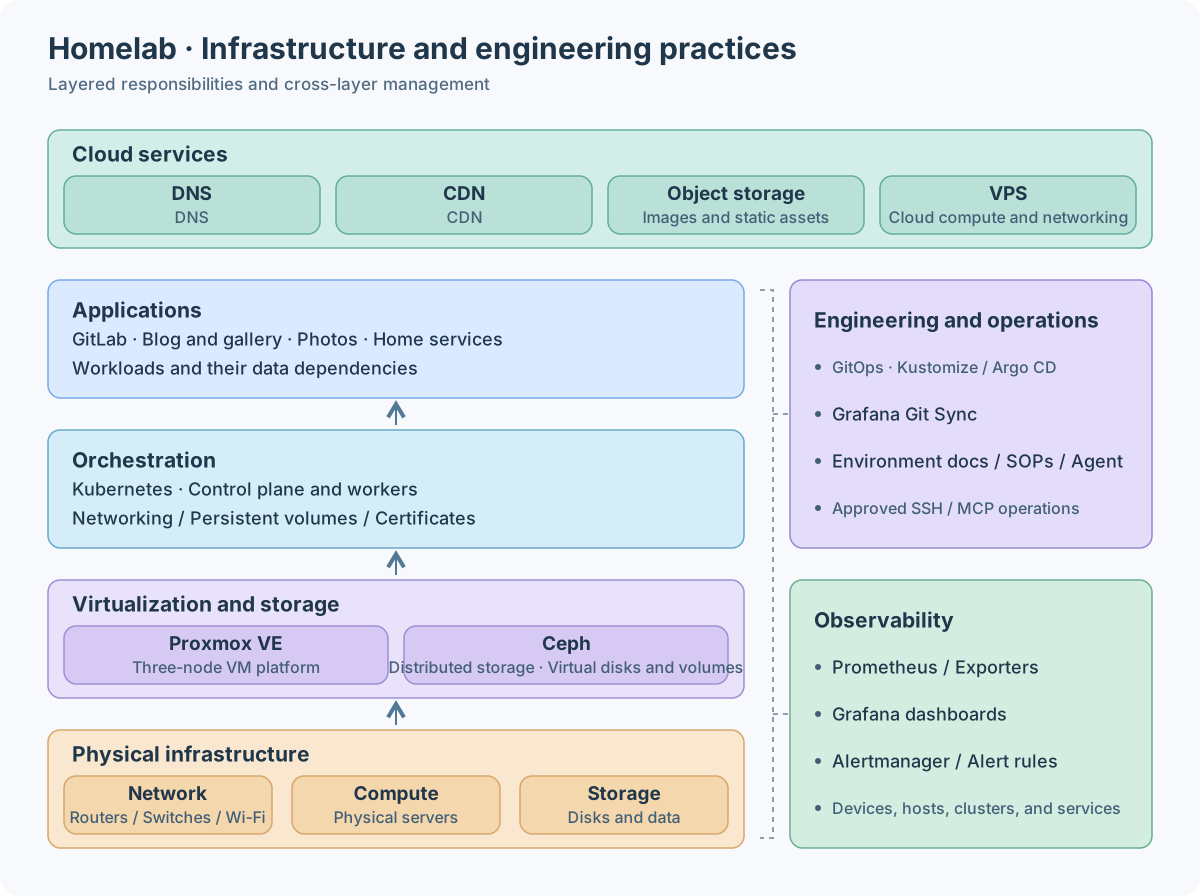
The main difficulty in long-term maintenance is the sustained attention it requires, concentrated in several areas.
-
Every layer needs regular maintenance. Proxmox VE, Ceph, Kubernetes, and the services running on them all need upgrades, compatibility checks, and configuration changes.
-
Each upgrade needs its own research. Release notes must be read, breaking changes identified, and possible effects on configurations, data, and services assessed before choosing an upgrade path.
-
Execution and troubleshooting take effort. My deployments have custom settings that can behave differently from standard environments. Diagnosis needs the actual configuration, logs, and runtime state, followed by verification of the fix.
I used to set aside several days of leave each year to maintain the whole environment. Researching versions and upgrade paths, executing changes, observing the results, and handling failures generally required continuous involvement. Standards reduced repeated investigation, but execution and verification still consumed attention.
As AI improved at understanding code, planning tasks, and using tools, I began considering how much more maintenance I could delegate to an agent. Production decisions still require human judgment about business impact. My own Homelab gives me room to experiment, provided I have cold backups of important data and clear recovery paths. The agent can perform more of the actual work while I retain key decisions and acceptance checks.
This article focuses on engineering discipline and context management, sharing how I helped an agent understand an existing environment and participate in maintenance, along with the problems and experience that followed.
Context Management and Engineering Practices
Before introducing an agent, I already had a fairly complete declarative Git repository, with Kustomize and Argo CD managing service deployments. It also contained many scripts for physical machines and VMs, covering initialization, configuration, and routine maintenance. Those accumulated configurations and scripts gave AI a starting point for reading the environment, preparing changes, and reusing operating procedures.
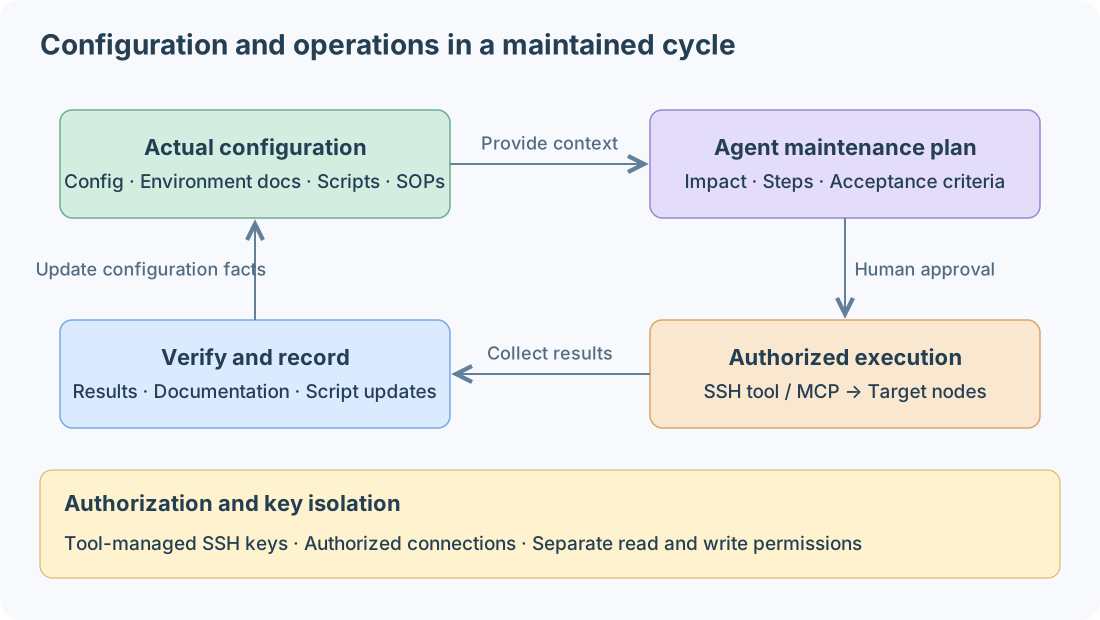
Maintaining Context Documents
Context is grounded in the current environment’s actual configuration. It records resource relationships, operating conditions, and decision background, and evolves with deployment changes. I use a few maintenance rules.
-
Record evidence and scope. Document configuration sources, script prerequisites, and acceptance criteria. Mark unconfirmed information for verification before applying old procedures to the current environment.
-
Update documents with changes. After deployment and verification, record versions, topology, configuration differences, and operating procedures.
-
Centralize shared conventions.
AGENTS.mddefines directory responsibilities, authorization boundaries, and verification requirements. Domain-specific documents hold environment details.
Environment documents are organized by responsibility.
| Domain | Directory | Responsibilities |
|---|---|---|
Network |
|
Device roles, topology, subnets, and connections |
Virtualization |
|
Hosts, VM placement, resource allocation, and lifecycle |
Storage |
|
Clusters, disks, data placement, and mounts |
Kubernetes |
|
Cluster composition, dependencies, maintenance, and troubleshooting evidence |
Cloud resources |
|
Cloud hosts, managed services, domains, and access relationships |
The documents also preserve context absent from configuration files, such as reasons for customizations, areas maintained manually, and recovery conditions.
Declarative Kubernetes Management
I generally use Kustomize for services I deploy myself, retaining flexibility over configuration. Directories group services by responsibility. Single-component services remain flat, while multi-component services split where needed.
.
├── apps/
│   └── <group>/
│       └── app.<service>.yml    # Application points to the service entry
└── kubernetes/
    └── <group>/
        ├── <single-component-service>/
        │   ├── kustomization.yml  # Resources, namespace, and images
        │   ├── deploy.yml         # Workload
        │   ├── service.yml        # Service access
        │   └── config/            # ConfigMap generator input files
        └── <multi-component-service>/
            ├── kustomization.yml  # Aggregate components and shared settings
            ├── <component-one>/
            │   ├── kustomization.yml
            │   ├── deploy.yml
            │   └── service.yml
            └── <component-two>/
                ├── kustomization.yml
                ├── statefulset.yml
└── pvc.yml-
Matching groups.
apps/andkubernetes/use the same responsibility groups. Each Application’ssource.pathpoints to the directory containing the service’skustomization.yml. -
Flat by default. A single-component service keeps its resources in one directory, adding routes, certificates, storage, or permissions as needed.
-
Split by component. Independently describable components get their own subdirectories. The parent aggregates them and maintains shared settings.
-
Separate manifests from configuration content. Resource files describe deployment structure.
config/holds files used byconfigMapGenerator, whose output the workload references.
Clear entry points and hierarchy help the agent locate the change scope, inspect rendered manifests, and extend the existing structure with less duplication and scattered configuration.
Accessing the Environment Through Tools
For potentially risky operations, my principle is to use mature tools with explicit rules and auditable execution. I keep direct environmental access behind those tools, which constrain entry points and scope and retain execution records. The agent invokes them within granted authorization.

Repository access lets an agent read configuration, prepare patches, and draft plans. Actual maintenance also requires visibility into runtime state and authorized access to nodes.
I manage physical-node and VM SSH connections centrally through XPipe and expose remote operations to the agent through MCP. Connections initially used to inspect configuration and build context also support later authorized maintenance. The agent can check settings, execute commands, and collect results through those tools.
Authorization boundaries and key isolation
Central key management. XPipe retains sensitive SSH keys. The agent can operate without handling private keys or placing them in project files or conversation context.
Authorized operations. The agent uses approved connections. Configuration inspection and changes receive separate authorization, and connectivity alone grants no blanket permission to modify resources.
Human confirmation for critical actions. Operations involving persistent data, node destruction, or other irreversible changes need an explicit target, impact assessment, and recovery arrangements before execution.
With tools connected, the workflow becomes reading documentation and current state, listing the plan and impact, confirming it, executing in stages, and collecting acceptance evidence. When assumptions fail, the plan needs revision before continuing.
Documenting Previously Unrecorded Configuration
My earlier environment documentation was sparse, mostly because I had put it off. It was my own Homelab, and its complexity was manageable. I knew the purpose of subnets and VLANs, routing and access boundaries, service locations, entry points, and storage dependencies well enough to keep much of it in my head.
Once AI became involved, I granted the necessary configuration-reading access through tools. For routers and switches, I exported configuration backups and asked the agent to organize networks, routes, and access rules. It combined those with the declarative repository to document service access, deployments, and storage dependencies. I checked the results and supplied background.
Using AI to prepare environment documentation was much easier than I expected. Router and switch backups were particularly effective. The agent could connect facts spread across interfaces, VLANs, routes, and access rules. Workload, Service, ingress, and storage manifests similarly revealed access paths and dependencies. Documentation finally stopped feeling like a task that required saving up energy for a dedicated session.
I added explanations absent from the configuration, including the reasons for network divisions, access boundaries, and customizations. Combining configuration facts with human context allowed the documentation to explain both operation and intent. Credentials stay outside the general context.

Archiving and removing obsolete material
Historical material provides traceability and reference. Current operating instructions require current evidence.
Retired devices, invalid settings, and old procedures need separate archives to avoid contaminating current context and leading the agent to incorrect conclusions or actions. Historical references should be checked against present conditions before use.
Material fully superseded by current documentation, with no remaining reference or traceability value, can be removed to reduce redundant context.
AI Ops in Practice
After establishing the initial context, I delegated several routine tasks to see how much research, execution, and troubleshooting the agent could handle. They included Kubernetes upgrades, declarative Grafana management, and GitLab and Argo CD upgrades. The first two cases are covered below, followed by VM and shared-script practices.
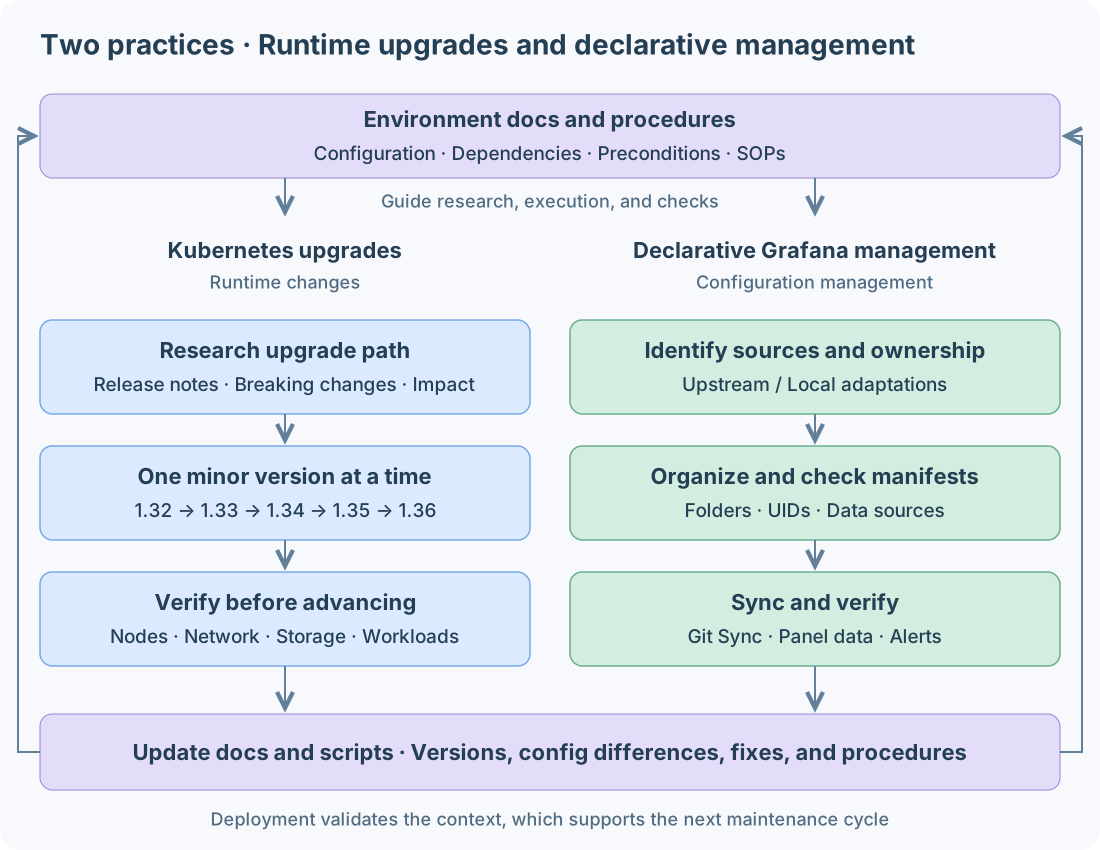
Upgrading Kubernetes Across Minor Versions
The cluster had gone nearly two years without systematic upgrade maintenance. Kubernetes evolves quickly, while a kubeadm environment still requires research into version changes, supporting-component adjustments, node upgrades, and verification. I decided to try delegating this upgrade to AI.
The work progressed from 1.32 to 1.36 one minor version at a time and included replacing the node operating systems.
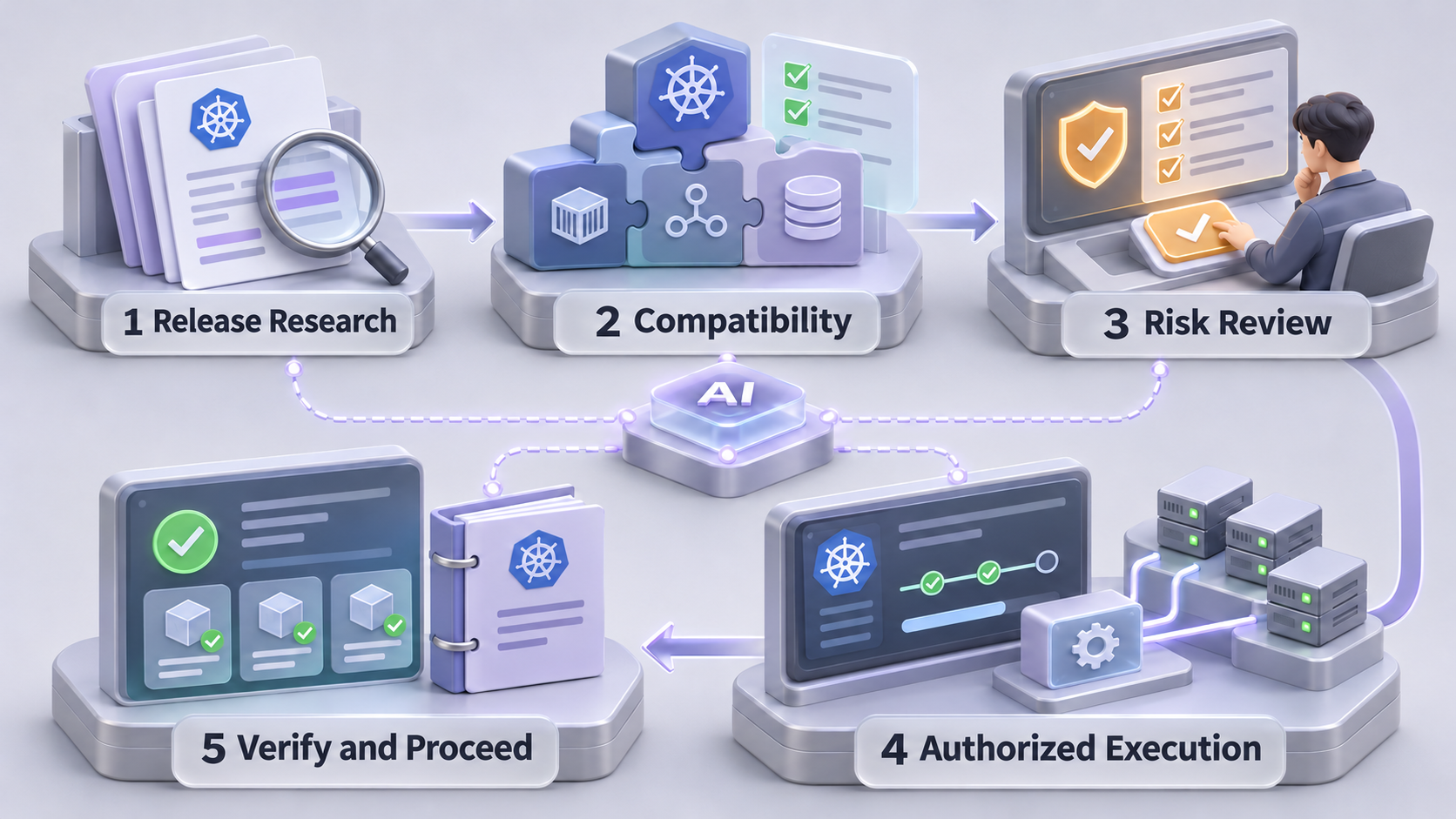
I first asked the agent to read environment documents, maintenance scripts, and cluster state and prepare a plan. The aim was to connect research, compatibility assessment, risk identification, and execution. I reviewed the plan and made key decisions.
-
Inventory the environment and research releases. Check Kubernetes, the container runtime, networking, and storage components. Read target-version notes and identify breaking changes and required adaptations.
-
Check compatibility and plan the route. Determine which supporting components need upgrades first, then sequence control-plane, worker, and OS changes. Follow the official kubeadm upgrade documentation for minor-version steps.
-
Identify risks and confirm the plan. The agent collects possible outages, configuration changes, and recovery arrangements. I choose the maintenance window, acceptable impact, and recovery points for my Homelab.
-
Execute through authorized tools. Adapt supporting components and upgrade nodes in stages, collecting results. Unexpected behavior calls for diagnosis using configuration and logs before revising later steps.
-
Verify before advancing. Check nodes and real workloads after each upgrade, test new Pods' networking and storage mounts, and verify reboot behavior after OS replacement. Record changes and conclusions before moving to the next release.
Working with AI during OS replacement
Before starting the new systems, I had the agent adapt a complete set of maintenance scripts from previous deployments. Existing procedures were reusable, with dependencies and configuration differences checked for the new OS.
I then created blank VMs from a template and authorized their SSH connections through XPipe. The agent used the documented context and scripts to initialize the systems, install dependencies, and join nodes. I supplied the system entry points, while sensitive keys stayed in the tool.
My Homelab can tolerate brief interruptions during maintenance, so some choices reflected the cost of maintaining a personal environment. I remained involved in outage decisions and exception handling.
The biggest change was being able to step away from the terminal. The agent could turn research into operations, then inspect results and troubleshoot. I mainly reviewed plans and confirmed key stages. According to my notes, the main upgrade work took about a day, excluding preparation of the documentation.
Declarative Observability Management
I started the second case with Grafana. The old version’s dashboards were mostly edited in the UI and stored in the database, outside the project’s context. I opened them when needed and added panels, but rarely documented why metrics were chosen, how dashboards should be organized, or what remained to improve.
After upgrading, I tried bringing existing dashboards into declarative management with Git Sync.
Git Sync connects Grafana dashboards to Git
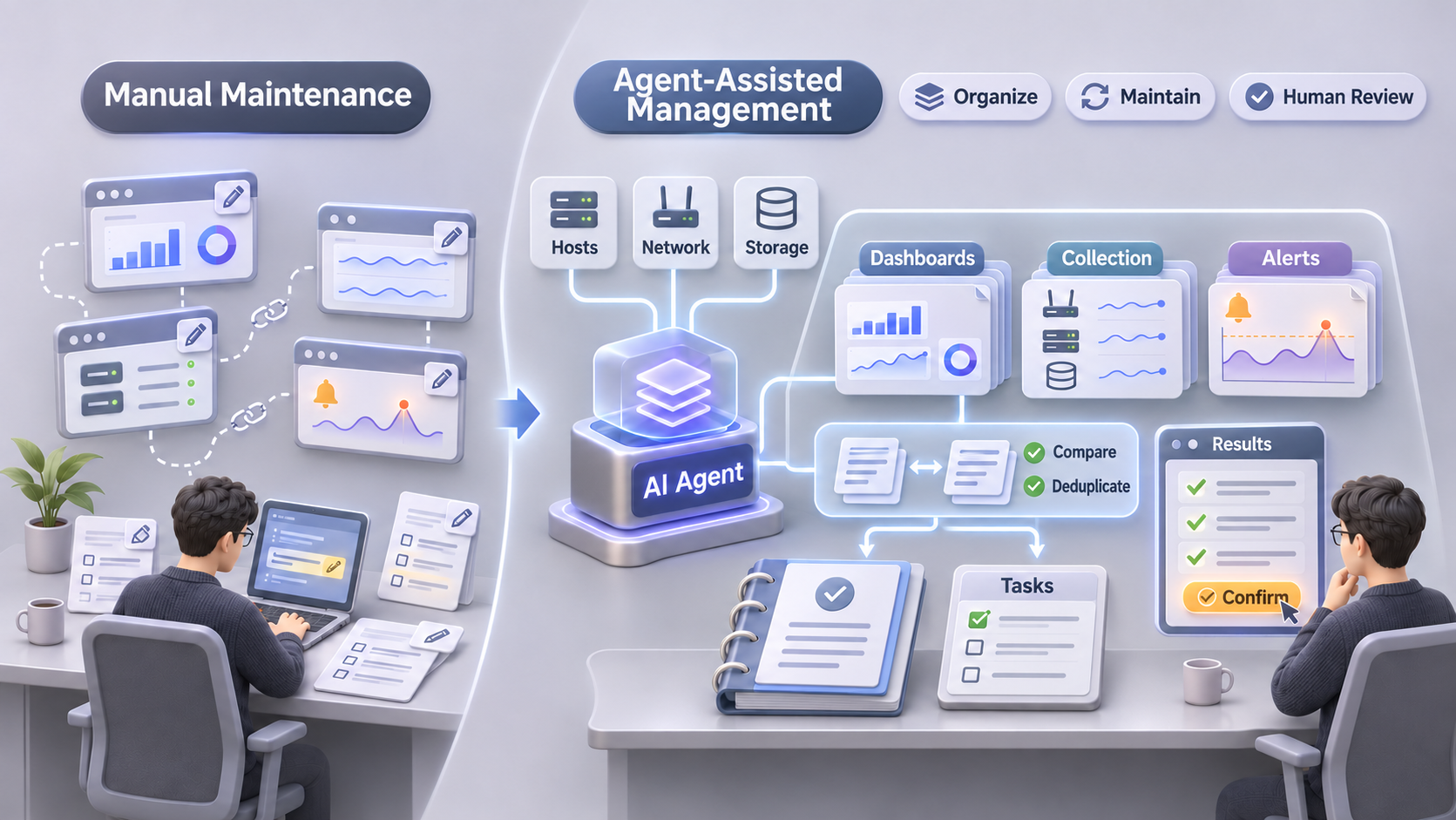
Git Sync synchronizes dashboards and folders with Git, supporting UI editing and repository JSON files. Configuration previously confined to the database becomes something the agent can read, compare, and modify, with design notes maintained alongside it. Collection settings and alert rules remain in their respective declarative deployments.
I asked AI to reassess the dashboards against the actual environment, distinguishing upstream content from local adaptations and identifying the needs of networks, hosts, storage, and services. It located configuration, compared content, and prepared changes. I supplied usage habits and design intentions, then we decided which information to retain and which monitoring gaps to address.
The scope expanded to metric collection and alert rules. I also involved AI in organizing, writing, and maintaining rules across the Homelab. Examples include checking collection coverage against device and service responsibilities, organizing host, storage, certificate, and availability rules, and making alert severity and notification wording consistent.
With dashboards in Git Sync and collection and alerting in declarative manifests, the agent can follow relationships from targets to metrics, panels, and alerts. I mainly confirm whether an alert deserves attention, whether its conditions match actual use, and whether deployment produces the intended result.
Being able to organize the observability design as a whole mattered more than bulk JSON edits. Configuration relationships, design notes, and improvements I had lacked time to address now have a maintained home. New services and network changes can draw on that context to extend monitoring and alerts together.
VM Management and Shared Scripts
I traditionally kept deployment and maintenance scripts in scripts/. OS initialization, network setup, disk expansion, runtime installation, and monitoring integration gradually accumulated reusable procedures.
Managing scripts as part of the project brings several benefits.
-
Traceability and review. Git preserves changes and their reasons. Script diffs can be checked before execution.
-
Reuse. The agent can compare scripts with actual settings, extract shared steps, and express node differences such as addresses, interfaces, and disks as explicit parameters.
-
Iteration. OS and deployment changes can adapt existing scripts, with troubleshooting conclusions and verification results recorded for future work.
AI helps compare, extract, and update scripts. I review critical changes before authorized execution. Each task leaves scripts and explanations that become usable context for the next.
Reflections
For me, AI has become something like an extension of my hands, taking on many tedious tasks previously handled manually. Research, configuration comparisons, repeated operations, and troubleshooting require less continuous attention. I mainly contribute design discussions, plan approval, and acceptance checks. Execution may take just as long, but being able to step away from the terminal already makes a substantial difference in a personal Homelab.
The experience strengthened a few priorities.
-
Reduce continuous supervision, leaving more attention for design and important decisions.
-
Use engineering practices and maintained context as the foundation, keeping configuration, documentation, and scripts synchronized.
-
Accumulate operational experience, recording changes and troubleshooting results for subsequent tasks.
I still decide whether an outage is acceptable, which upgrade route to take, and whether to continue after unexpected results. I can also spend more time and energy exploring new projects.
Last modified on 2026-10-15